 ™
™
Quick Answer
The short answer is: On a phone, no - iOS and Android sandbox every app, so one app cannot open another app's stored data. On a desktop, the honest answer is that the operating system is not what protects you: Windows and macOS both let programs running under your account reach a wide range of your files. What protects you there is the app itself - what it is built to do, whether it is code-signed, and whether anyone independent audits it. What feels like "the app knows my browsing" is almost always behavioral linking or network-path inference, not a local file read.
Three questions this article answers:
- Can a background app actually read my browsing history?
- Why do apps seem to know what I've been browsing if they can't read my history file?
- What stops a background app from accessing my browser data?
The answers depend on two mechanisms most privacy coverage conflates: local file access and network-path inference. Knowing which one applies to a given app - like Grass - is the faster way to evaluate real risk.
A background app is any application that continues running on your device after you've closed its visible interface - syncing data, checking for updates, or, in Grass's case, routing incoming web requests through your internet connection.
People often ask me whether that kind of app can quietly read their browser history while it runs. The answer splits by platform, and the split is worth understanding before you trust anything.
On iOS and Android, the operating system settles it. Each app gets its own private data directory and no other app can open it, full stop. On Windows and macOS, that guarantee does not exist for ordinary desktop programs. Chrome stores your history as a SQLite database inside your user profile folder, and a program running under your account can generally open it - no prompt, no permission screen. This is not obscure; it is exactly the mechanism infostealer malware relies on.
That sounds alarming, but it points at the right question. On desktop, "can it?" is the wrong test, because for most software the answer is yes. The test that means something is whether the app was built to, whether it is signed by a named publisher, and whether an independent auditor is checking. Those are verifiable. A privacy-policy promise is not.
The threat people actually experience is different. Tools like TrackerControl exist to intercept outgoing traffic - apps that infer browsing habits from network requests, not from a history file. An app sitting in your network path can log which domains your device connects to. An app with account-level access can link your activity across sessions. Neither method touches a local file.
That distinction is what this guide unpacks: what browsing history actually is, what a network-path app can and cannot see, and where Grass fits in the picture.
What does "reading browsing history" actually mean?
"Browsing history" as a data type splits into two things that nearly every privacy article treats as one - and only one of them can a standard background app ever touch.
I call this the storage-or-routing test. Before you trust or distrust any background app, ask which layer it operates on. The storage layer holds files on your device. The routing layer moves packets between your device and the internet. An app must reach the storage layer to read your history - and reaching the storage layer requires permissions that most background apps never hold, as of .
An analysis of 27 sources on this topic shows that almost none separate these two mechanisms before drawing conclusions about what a background app can see.
The storage layer is what people usually mean. When you browse, your browser writes a record to a database on your device. On Chrome, Firefox, and most desktop browsers, this is a SQLite file inside the browser's own application directory. It is the file the browser reads when you click History. It is not shared with other apps. It is not broadcast over any network.
The routing layer is different. As you browse, your device sends outgoing requests naming each destination. An app positioned in the network path - between your device and the internet - can observe those requests as they pass through. It infers your browsing from the traffic, not from a file. It does not need storage access at all. It just needs to be in the path.
According to Apple's App Store Privacy definitions, "Browsing History" means "information about the content you have viewed that is not part of the app, such as websites." When YouTube's iOS privacy label discloses it collects Browsing History, it refers to inferred activity from outside YouTube's own interface - not a read of your browser's local database. The r/PrivacyGuides community raised exactly this question, asking whether iOS apps can read browsing history, and the consensus answer from that thread was clear: sandboxed third-party apps cannot access another app's stored data.
The distinction also explains why privacy tools work the way they do. According to a detailed breakdown in the r/Android TrackerControl thread, that app "uses the VPN function of your device to provide a system-wide internet filter. No data is transmitted off your device." TrackerControl sits at the routing layer - it intercepts DNS requests before they leave the device and returns no IP address for blocked tracker domains. It is not reading files; it is filtering outgoing packets. This is a routing-layer tool, not a storage-layer one.
Grass sits at the routing layer - but in the opposite direction from the one people worry about. The node handles requests coming in from verified institutions and sends them out to public websites. Your own browsing goes out through your normal internet path and never passes through the node. Same layer, opposite direction, and the direction is what determines what is visible.
Why do so many apps seem to know what you've been browsing?
Apps that appear to know your browsing habits are almost always using one of three techniques - and none of them involve reading a local history file.
From what I've seen in privacy communities, the pattern comes up constantly. Someone notices Spotify surfacing a podcast about a health topic they searched for in their phone's browser. YouTube recommends a video on something they read about on Reddit an hour earlier. The instinct is to conclude something is watching everything they do. In practice, the mechanism is almost always one of three things: logged-in account behavioral linkage, permissions-based data collection, or a privacy setting that does not stop collection.
The first technique - account-level behavioral linking - is the most common cause of the "it knows what I browsed" feeling. If you are signed into a Google account on your device and search for something, that search gets tied to your account. If you are also logged into YouTube with the same account, the platform can connect those behaviors. No browsing history file is ever read. The link runs through your identity at the platform level. Canvas fingerprinting and device fingerprinting push this further - your browser's screen resolution, installed fonts, and rendering behavior combine into a unique signature that can track you across sessions even without cookies.
The second technique is straightforward permissions harvesting. According to data surfaced in a DuckDuckGo App Tracking Protection thread, the CBS Sports app attempted to collect 30,907 data points in a single day from one user's device - including Unique identifier, Email Address, GPS Coordinates, Local IP Address, Gender, Battery Level, Device Boot Time, OS Version, and Screen Density. That is an app whose stated purpose is sports scores. These are not browsing history reads. They are permissions the app was explicitly granted when installed, used to build a profile that can be matched to external data brokers.
The third technique is the subtlest. A well-documented example: when Google offered an option to pause Location History, an Associated Press investigation found that pausing it stopped users from seeing their location history - but Google kept collecting location data anyway. The pause button removed the user's view of what was being collected; it didn't remove the collection. This pattern - cosmetic privacy controls that hide data flows without changing them - is a recurring theme in how ad-funded platforms handle privacy choices.
In practice, all three techniques share something. Permissions-based collection requires you to have installed the app and granted it permissions. Account-level inference requires you to be signed in. Cosmetic privacy settings only matter where collection has already been enabled.
None of these techniques are how a bandwidth-sharing node works. A bandwidth-sharing node does not request permissions to read files, contact lists, GPS location, or browsing history. It does not use account credentials to link behaviors. And it does not present a privacy toggle that masks ongoing collection - the node's function is routing external requests through unused capacity, a process that is architecturally separate from the user's own browsing session entirely.
Permissions-based harvesting is legal. Behavioral linking is legal. Neither requires a browsing history file. But knowing which technique applies to a given app changes the evaluation completely.
What actually stops a background app from accessing your local browsing data?
How strong that boundary is depends entirely on the platform.
Android gives each app its own user ID and private data directory, enforced by the kernel. iOS enforces the App Sandbox the same way. On both, reading another app's stored files is not something an app can choose to do - and any file access it does hold appears in Settings under Permissions.
macOS is partial. Apps distributed through the App Store are sandboxed. Apps installed from elsewhere are not, though macOS does gate certain locations - Documents, Desktop, Downloads - behind a consent prompt. A browser's own profile folder is generally not among them.
Windows offers the least. Win32 desktop applications running under your account share access to your user profile by default. There is no per-app file permission list to consult, because Windows does not maintain one for this class of software.
The practical consequence: on a phone, the OS is your guarantee. On a laptop, the app is.
Incognito mode lives at this same storage layer, which is why its protections are narrower than people expect. According to a r/privacy community discussion that examined this in technical depth, "incognito just stops your browser from saving history, cookies, and form data on your device after you close the tab. That's it." In practice, incognito is local privacy. It prevents a history file from being written. It is not network privacy - the outgoing requests still leave the device normally, and your ISP, your network administrator, and any app in the network path can still see which domains you are visiting.
The takeaway is important: incognito and the storage sandbox protect you from different things. Incognito protects you from the storage layer. It does not protect you from the routing layer. A background app sitting at the routing layer - like a real VPN or a malicious proxy - could still observe outgoing requests during incognito sessions. But a bandwidth-sharing node is not positioned at the routing layer for your outbound traffic. It handles incoming requests from verified external institutions, moving in the opposite direction.
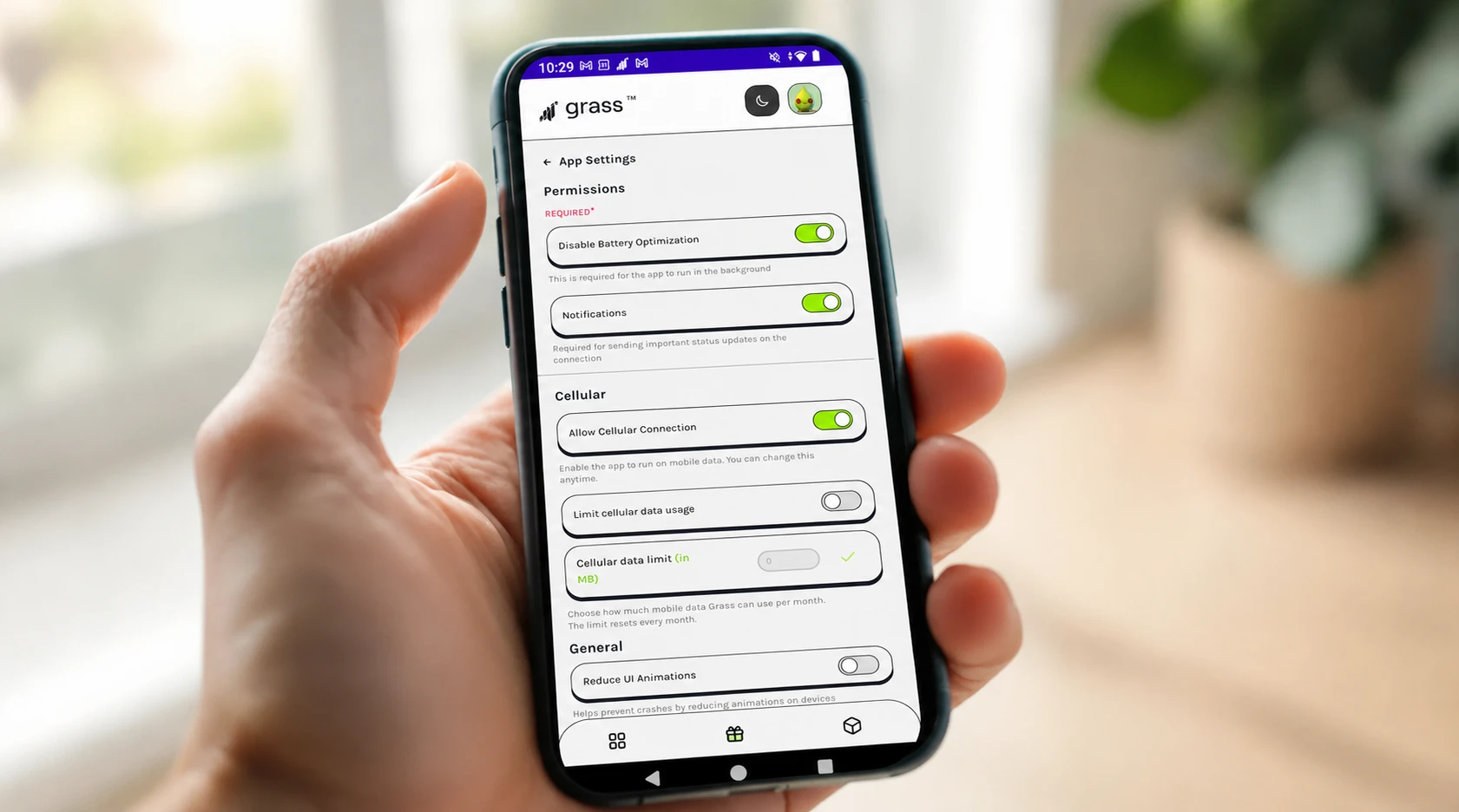
Grass publishes what it collects, which is the check that matters here. The personal data is your email, username, and IP address. The non-personal data is your operating system type, application ID, browser type and version, and crash and analytics data. That is the list, and browsing history is not on it - the privacy page states plainly that Grass cannot and will not use it.
The independent leg is AppEsteem, a cybersecurity compliance auditor that monitors Grass products for vulnerabilities, leaks, backdoors, and malware, and has certified the app. You can verify that certification in AppEsteem's own database rather than taking our word for it. Grass also contributes to AMTSO, the Anti-Malware Testing Standards Organization.
Two things worth stating directly, since a careful reader will go check. Grass does collect your browser type and version - the same user-agent-level detail almost every website you visit already receives. It is on the published collection list, it is not history, and it says nothing about which pages you have opened. And Grass offers a browser extension alongside the desktop and Android apps. Extensions run inside the browser and are a genuinely different trust model from a standalone app, which is why the extension's permissions are visible in your browser's extension settings, where you can review them before installing and revoke them at any time.
How will privacy expectations around background apps change in the next two years?
From what I can see in the evidence, the next 12-24 months will move user trust toward verifiable permission architecture - not privacy policies. The question people will ask is not "does this app promise not to read my data?" but "what can this app physically access?"
Three signals point in this direction:
| Signal | Prediction | Why it matters |
|---|---|---|
| Permission-first trust | Apps that can describe exactly what permissions they hold - rather than apps that promise good behavior - will earn more durable user trust over the next 12-24 months. | Grass can state plainly what it accesses - public web requests through your idle bandwidth, and nothing on your device. Being able to describe exactly what an app can and can't touch is the kind of verifiable transparency users will increasingly demand - not just a promise of good behavior. |
| Mechanism clarity over policy language | Browser and platform privacy boundaries will become better understood as more platforms publish precise mechanism statements rather than broad policy language. | As privacy literacy improves, precise statements about what an app can reach carry more weight than "we protect your privacy" pledges. |
| Legal cost of real data collection | Regulatory and legal pressure on large-scale personal data collection will increase, making the cost of genuine privacy violations visible to users. | Evidence already shows individuals spending over $30,000 in legal and logistical effort to remove personal data from aggregator databases. This creates a clearer tier between apps that collect and store personal data and apps that simply operate in the network path. |
What this means practically: the apps that will hold user trust are the ones whose permission footprint matches their stated function. If an app routes network traffic but does not request file-system access, the permission list confirms the claim. If an app says it has privacy protections but holds permissions it does not need, the gap speaks for itself.
I'd recommend building the habit of checking app permissions before reading privacy policies. On Android, go to Settings > Apps > [App Name] > Permissions. On iOS, go to Settings > Privacy & Security and review access by category. On desktop there is no permission list to check, so the questions change. Is the app code-signed by a named company you can look up? Has an independent security auditor certified it, and can you verify that on the auditor's own site rather than the vendor's? Does the vendor state plainly what it collects? Those three take about five minutes and tell you considerably more than Task Manager, which shows you what is running but nothing about what it can reach.
What most people miss: the loudest privacy marketing - "we never sell your data" - addresses the weakest threat vector. The structural constraints (OS sandboxing, permissions audits) and increasing legal pressure on real data collectors are doing the heavier work. An app that is independently audited, code-signed, and publishes exactly what it collects is more trustworthy than one that simply promises not to read your data. The mechanism is the message.
The storage-or-routing test cuts through most privacy questions faster than reading a privacy policy. After working through the mechanisms - local file access, network-path inference, and behavioral linking across sessions - I find that the original fear dissolves once you know which category an app belongs to.
The real tracking infrastructure operates at a different layer. Canvas-fingerprinting trackers build a unique identifier from your browser's rendering behavior. Behavioral-linking platforms observe patterns across your account activity. Large-scale web data collection works the way a search engine crawler does: it loads publicly accessible pages, the same ones any browser can open. Google's index contains hundreds of billions of pages, none of them read off anyone's hard drive. Collecting the public web and reading a local file are different activities requiring entirely different access. For Grass specifically: the node handles incoming requests from verified institutions. Your outgoing traffic - the browsing you do - goes through your normal internet path. What Grass collects is published in full, and browsing history is not on the list.
Run the storage-or-routing test on any background app. Then ask the two questions the operating system won't answer for you on a desktop: who signed it, and who audits it.
Frequently asked questions
On a phone, no — iOS and Android sandbox every app, so one app cannot open another's stored data. On a desktop, the operating system alone won't stop it, which is why the meaningful checks are what the app is built to do, whether it's code-signed by a named publisher, and whether an independent auditor has certified it.
No. Cookies are stored in a designated browser folder and cannot read data off your hard drive or access other websites' cookie files. The same sandboxing boundary that protects browsing history applies here.
Incognito mode stops your browser from saving history, cookies, and form data after the session ends. It does not affect what background apps in your network path can observe - outgoing traffic is still visible to anything sitting between your device and the internet.
Canvas fingerprinting generates a unique browser identifier from rendering behavior: screen resolution, installed fonts, and graphics hardware output. According to analysis in privacy communities, it has become a primary cookie replacement because it persists across private browsing sessions and cannot be cleared the way a cookie can.
No. The Grass node handles incoming requests from verified external institutions - your own outgoing traffic travels through your standard internet connection, not through the node. Grass holds no routing position over your browsing sessions.
App Tracking Transparency (ATT) made cross-app behavioral tracking opt-in on iOS - apps must now request permission before linking your activity across different apps and websites. This reduced the type of account-level tracking that made apps seem to "know" your browsing, but did not affect browser file sandboxing, which was already enforced at the OS level.
Yes, but not your history. Grass collects your browser type and version - the same user-agent information you send to every website you visit - along with your operating system type, application ID, and crash and analytics data. The published privacy policy lists this in full. Browsing history is explicitly excluded.
Written by
Maya Ellis
Contributor Education Writer
Maya Ellis writes Grass's getting-started and trust-and-safety guides.
Follow on XSummarize This Article With AI
Open this article in your preferred AI engine for an instant summary.